JWT Encoder/Decoder
Header: Algorithm & Token Type
Payload: DATA
Sign JWT: Secret
Json Web Token
The JWT Decoder Tool allows you to decode JWTs for simple debugging. You can also create your own JWTs with custom payloads signed with your own secret for testing purposes.
Note: We do not store any information in our database and all processing is done on the client side.
For your protection, all JWT debugging and validation happens in the browser. Be careful where you paste or share JWTs as they can represent credentials that grant access to resources.
What is JWT Encoder/Decoder?
JWT Encoder/Decoder is an online tool that allows you to encode and decode JSON Web Tokens (JWT). A JWT is a compact, URL-safe means of representing claims to be transferred between two parties. The claims in a JWT are encoded as a JSON object that is used as the payload of a JSON Web Signature (JWS) structure or as the plaintext of a JSON Web Encryption (JWE) structure.
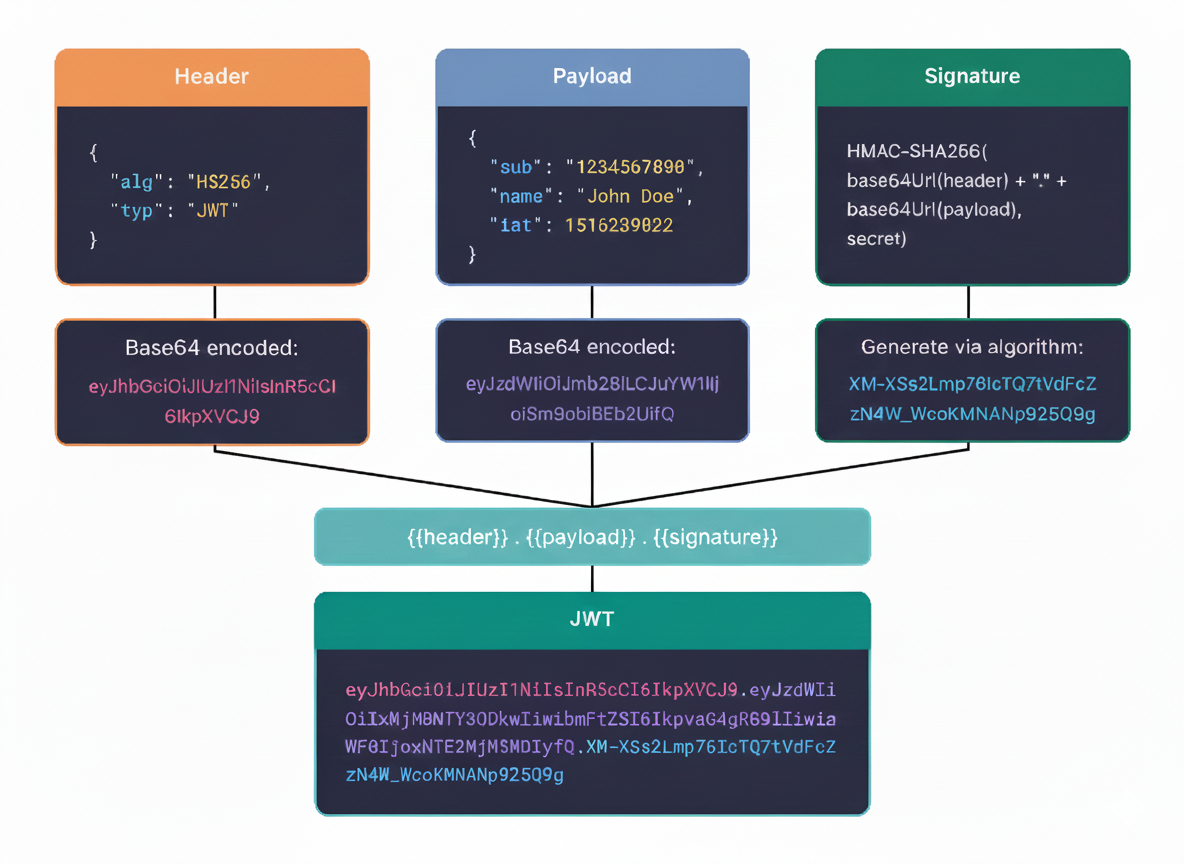
JWTs are commonly used for authentication and information exchange in web applications. They consist of three parts separated by dots (.): Header, Payload, and Signature. This tool helps you understand the structure of JWTs by encoding your custom header and payload, or decoding existing tokens to view their contents.
JWT Structure
A JWT consists of three parts:
- Header: Contains metadata about the token, typically the type of token (JWT) and the signing algorithm being used (e.g., HMAC SHA256 or RSA)
- Payload: Contains the claims or statements about an entity (typically the user) and additional data. Claims can be registered, public, or private
- Signature: Used to verify that the sender of the JWT is who it says it is and to ensure that the message wasn't changed along the way
Common Use Cases
- Authentication: Once a user logs in, each subsequent request includes the JWT, allowing access to routes, services, and resources
- Information Exchange: JWTs are a secure way of transmitting information between parties because they can be signed
- API Authorization: Stateless authentication for RESTful APIs
- Single Sign-On (SSO): Share authentication across multiple applications
- Token-based Authentication: Replace session-based authentication with stateless tokens
How to Use JWT Encoder
- Edit Header: Modify the JSON header to specify the algorithm and token type
- Edit Payload: Add your claims and data to the payload JSON object
- Enter Secret: Provide a secret key for signing (for demonstration purposes)
- Click Encode: Generate your JWT token
- Copy Token: Use the copy button to copy the encoded JWT
How to Use JWT Decoder
- Paste JWT: Paste your JWT token into the input field
- Click Decode: The tool will parse and display the header, payload, and signature
- View Components: Examine the decoded header and payload in formatted JSON
- Verify Signature: View the signature component of the token
Security Considerations
Important: This is a demonstration tool. In production environments:
- Never expose your secret keys in client-side code
- Always validate JWTs on the server side
- Use strong, randomly generated secrets
- Implement proper token expiration and refresh mechanisms
- Use HTTPS to prevent token interception
- Store tokens securely (avoid localStorage for sensitive data)
Example JWT
eyJhbGciOiJIUzI1NiIsInR5cCI6IkpXVCJ9.eyJzdWIiOiIxMjM0NTY3ODkwIiwibmFtZSI6IkpvaG4gRG9lIiwiaWF0IjoxNTE2MjM5MDIyfQ.SflKxwRJSMeKKF2QT4fwpMeJf36POk6yJV_adQssw5c
This token decodes to:
Header:
{
  "alg": "HS256",
  "typ": "JWT"
}
Payload:
{
  "sub": "1234567890",
  "name": "John Doe",
  "iat": 1516239022
}
Enjoying the tools? Support the project!